AI security assessment
What Is an AI Security Assessment? Start With AI Permission Requests
Updated Steve Greenberg, Founder & President, Manage IT NY Inc., Plainview, NY
Direct answer. An AI security assessment is a review of which AI tools your business uses, what data they can reach, and whether that access is safe. One of the first things it checks is easy to overlook: the permission requests your team clicked Accept on.
What is an AI security assessment?
Most AI assistants, meeting notetakers, email helpers and chatbots that connect to Microsoft 365 or Google Workspace ask for access through a consent screen like the ones in this post.
Those clicks often happen without IT. In Microsoft's 2024 Work Trend Index, a survey of 31,000 people in 31 countries, 78% of people who use AI at work said they bring their own AI tools, and 80% at small and medium-sized companies (Microsoft WorkLab, Work Trend Index 2024). In this post, we walk through real Microsoft 365 consent screens from popular business apps, what each line means, and what a good AI security assessment does about them.
78%
of people who use AI at work said they bring their own AI tools
80%
at small and medium-sized companies
Source: Microsoft WorkLab, Work Trend Index 2024, a survey of 31,000 people in 31 countries.
What AI permission requests look like
AI tools use the same kind of permission screens as any other app. The three screens in this post are real Microsoft 365 consent requests from popular business apps that many companies already use. They show how broad the requested access can be, and what IT should review before anyone clicks Accept.
A Microsoft 365 request for mail and full file access
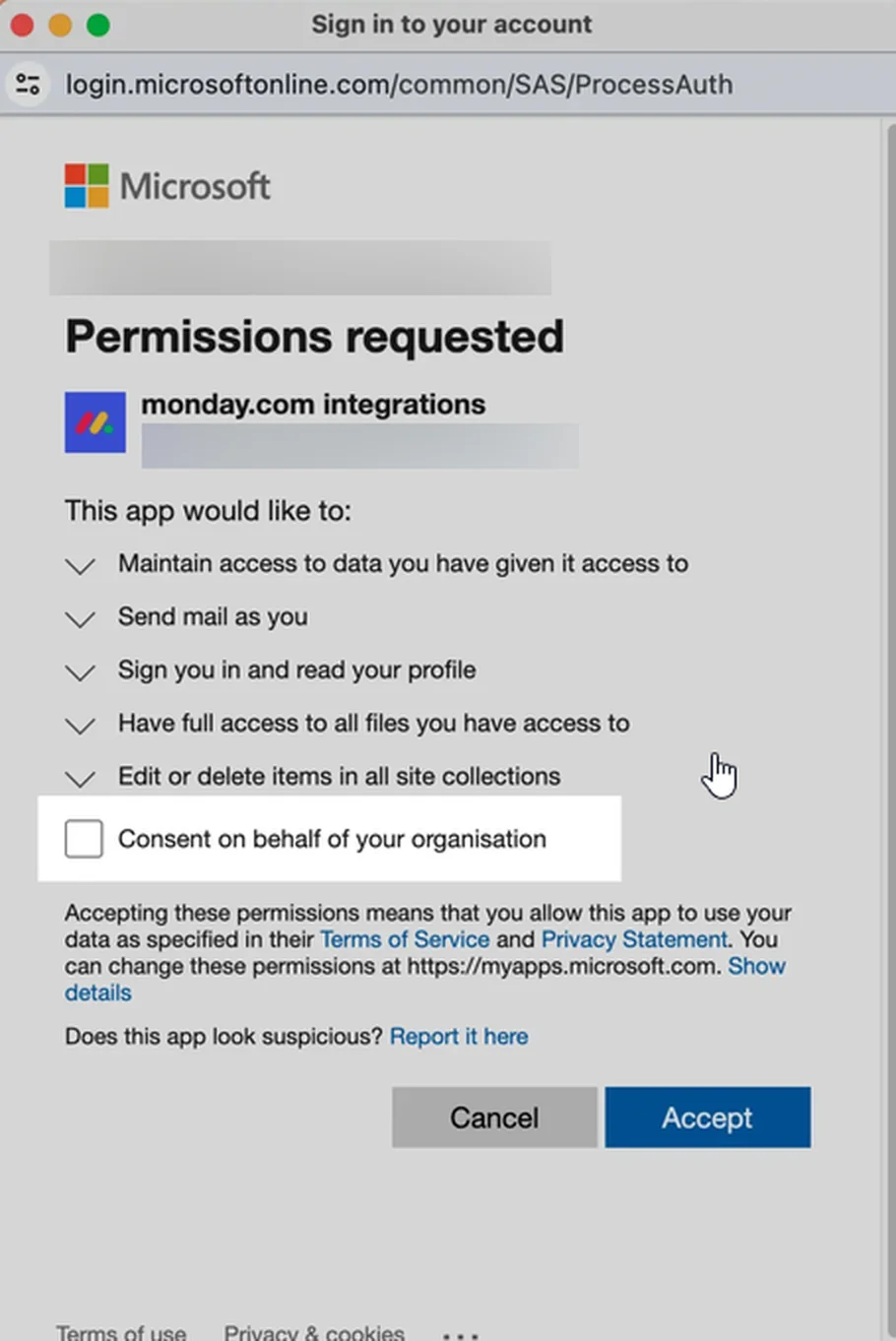
monday.com is a work-management platform many companies already use. In this Microsoft 365 consent screen, monday.com integrations asks to send mail as you, to have full access to all files you have access to, and to edit or delete items in all site collections. It also asks to sign you in, read your profile, and maintain access to data it has been given. The “Consent on behalf of your organisation” box is unchecked. A Microsoft 365 tenant on Microsoft's current default would send a request like this to an admin instead of letting the employee approve it.
Broad access vs. least privilege
NIST defines least privilege as restricting access "to the minimum necessary to accomplish assigned tasks"
Broad access
- AI can read, send and delete across the whole mailbox
- One stolen token exposes everything that app was allowed to reach
- Mistakes or bad prompts can email customers with no human check
- Access stays in place long after the pilot ends
The solution
Least privilege
- The AI drafts; a person reviews and hits send
- Access is scoped to one mailbox, folder or calendar
- A stolen token reaches far less data
- Access is reviewed and removed when no longer used
Broad permissions are convenient on day one. The cost shows up later, when a vendor is breached, a token is stolen or an AI agent does something nobody expected.
A verified publisher, still asking for mail and full calendar access
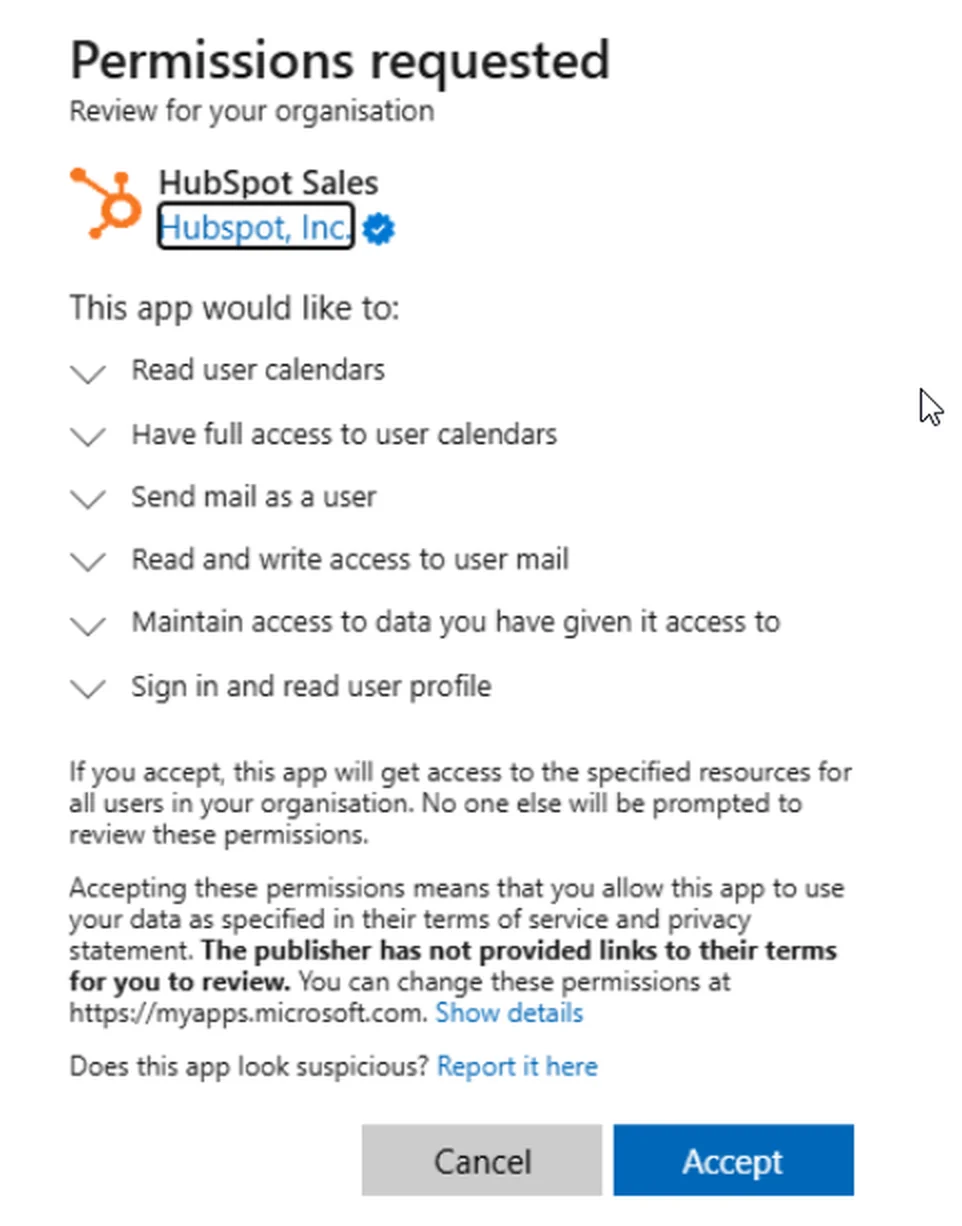
A longer permission list can look routine because each line is written in plain language. This Microsoft 365 screen for HubSpot Sales, a sales platform many companies use, is published by HubSpot, Inc. and shows a verified publisher badge. That badge tells you who built the app, not whether the access is the right size. The app asks to read user calendars and to have full access to user calendars, not just free and busy times, and it also asks to send mail as a user and to read and write user mail. If you accept, the screen says the app gets access for all users in the organization, and no one else is prompted to review the permissions. Whether that much access fits depends on how your team actually uses the app, which is exactly what an assessment checks. In a Microsoft 365 tenant on Microsoft's current default, a calendar request like this would go to an admin for approval.
A real example: one chatbot, many breached companies
In August 2025, Google's Threat Intelligence Group reported that attackers stole OAuth tokens connected to Salesloft Drift, an AI chatbot and sales platform. From about August 8 to August 18, 2025, they used those tokens to export large volumes of data from numerous companies' Salesforce instances, then searched it for passwords and cloud access keys (Google Threat Intelligence Group, August 26, 2025).
On August 28, Google confirmed the attackers had also used OAuth tokens for the Drift Email integration to access email in a very small number of Google Workspace accounts that had been connected to Drift. The attackers didn't need a new password or a new consent click; they used access that had been granted to an integration earlier.
Ensure that applications have the minimum necessary permissions and avoid overly permissive scopes like full access.
What an AI security assessment checks
Microsoft's current default setting, "Let Microsoft manage your consent settings", is the default for new tenants. It stops employees from approving, on their own, apps that ask to read their mail, calendar, chats or all of their files; those requests go to an administrator instead (Microsoft Learn, Manage app consent policies). Permission to send mail as the user is not on that blocked list. Tenants set to the older "Allow user consent for apps" option still let employees approve any permission that doesn't need an admin (Microsoft Learn, Configure how users consent to applications).
Google Workspace gives administrators similar controls over third-party apps (Google Workspace Admin Help). An AI security assessment checks which setting you are on, and what was approved before it changed.
Inventory AI tools.
Find approved and unsanctioned AI tools, including browser extensions and notetakers.
Review AI permission grants.
List the apps with access to mail, calendars and files, and flag send-as, full-mailbox and all-files permissions.
Check consent settings.
Confirm whether employees can approve new apps on their own, and whether an admin approval workflow is on.
Match access to the job.
Compare what each tool can do with what it actually needs, and mark what to reduce or remove.
Prioritize fixes.
Leave with a short list of the highest-risk access to close first.
Microsoft's admin consent workflow lets employees request a review when they cannot approve an app themselves (Microsoft Learn, Configure the admin consent workflow). That keeps adoption moving while IT stays in the loop. Some businesses call this an AI security audit or AI security risk assessment; the goal is the same.
Organization-wide consent in one checkbox
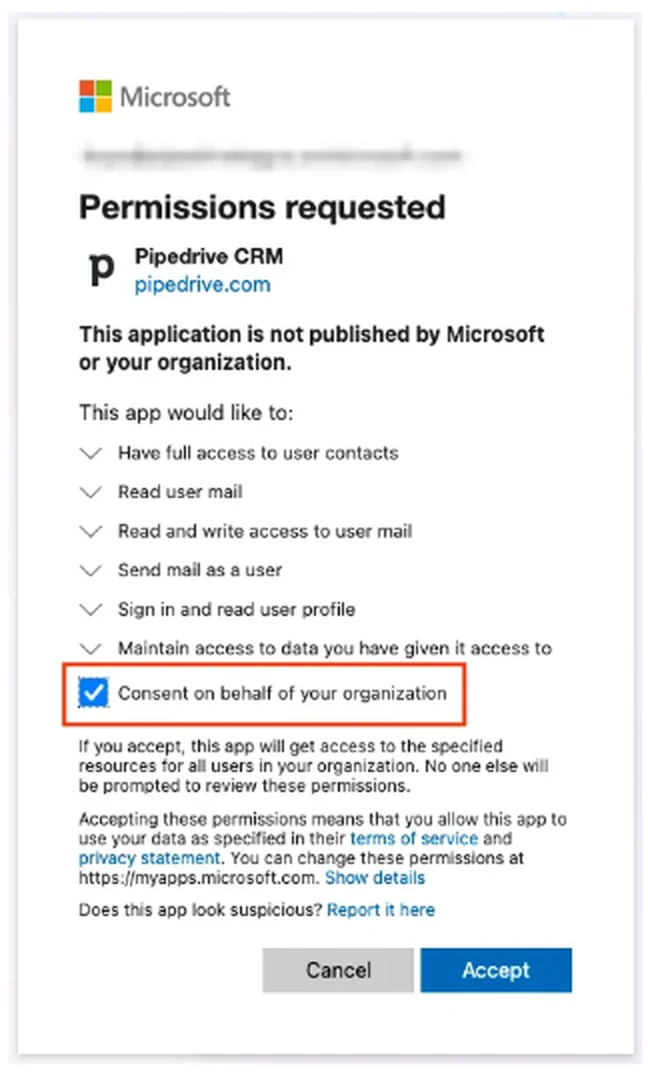
This Microsoft 365 screen for Pipedrive CRM, a sales tool many companies use, asks for full access to user contacts, to read and write user mail, and to send mail as a user. It also notes that the application is not published by Microsoft or your organization. “Consent on behalf of your organization” is checked. If you accept, the screen says the app gets access for all users in the organization, and no one else is prompted to review the permissions. That is the kind of grant an AI security assessment reviews: not because a well-known business app is unsafe, but because the access is broad and organization-wide.
AI security assessment vs. AI audit vs. AI penetration testing
An assessment, an audit and AI penetration testing answer different questions. An assessment finds the AI tools in use and what they can access, then ranks what to fix first. An audit tests those controls against a written standard and produces formal evidence. AI penetration testing is hands-on: in a controlled engagement, testers try to make a specific AI app or integration leak data or misuse the tools and tokens it already has.
The OWASP Top 10 for LLM Applications 2026 lists prompt injection (LLM01) and sensitive information disclosure (LLM02) among the leading risks for applications built on large language models, and excessive agency (LLM03) when a model is given too much power to act. Those are the kinds of problems an AI penetration test is built to find. It can also check over-permissioned connectors and tokens — the same kind of access the consent screens above make visible.
If your company builds its own AI apps or agents, AI penetration testing is usually the work that probes those apps for prompt injection and data leaks. Most small and mid-sized businesses start with an assessment of the tools staff already use.
| What it is | What you get | |
|---|---|---|
| Assessment | Finds AI tools and access, ranks fixes | An inventory, ranked findings, and a short fix list |
| Audit | Tests controls against a written standard | Formal evidence against that standard |
| AI penetration testing | Hands-on attempts to make a specific AI app leak data or misuse its tools | Documented findings from a controlled test of that app or integration |
Assessment
What it is
Finds AI tools and access, ranks fixes
What you get
An inventory, ranked findings, and a short fix list
Audit
What it is
Tests controls against a written standard
What you get
Formal evidence against that standard
AI penetration testing
What it is
Hands-on attempts to make a specific AI app leak data or misuse its tools
What you get
Documented findings from a controlled test of that app or integration
Manage IT NY offers AI penetration testing as a separate engagement from the free assessment. We do not guarantee a particular outcome, and this is not a certification. If it is the right next step, contact us or talk with us after the assessment.
After the assessment: governance and monitoring
An assessment is a snapshot. AI security governance keeps access matched to the job as tools, vendors and staff change. The NIST AI Risk Management Framework, released January 26, 2023, organizes this into four functions: Govern, Map, Measure and Manage (NIST, AI Risk Management Framework).
Write a short AI use policy: approved tools, what data can go in, and who approves new connections
Keep an inventory of every AI tool and the permissions it holds
Review app permissions on a regular schedule and remove anything unused
Alert on new consent grants, especially send-mail, full-mailbox and all-files permissions
Revoke tokens and rotate credentials quickly when a vendor reports a breach
Train staff to pause on permission screens and route requests to IT
Changing consent settings does not remove grants that already exist; Microsoft documents how to review and revoke them (Microsoft Learn, Review permissions granted to enterprise applications). That cleanup is usually the first job after an assessment.
To run this as an ongoing program, with an acceptable use policy, data loss prevention and approved enterprise AI tools, see our AI security service. For vCISO-led oversight, see AI security governance.
The numbers behind the risk
13%
Breached organizations that reported a breach of AI models or applications
97%
Of those, share without AI access controls
63%
Breached organizations with no AI governance policy, or still writing one
1 in 5
Organizations reporting a breach due to shadow AI
$670,000
Added breach cost with high levels of shadow AI
$10.22M
Average cost of a US data breach (a record)
Source: IBM Cost of a Data Breach Report 2025, conducted by Ponemon Institute, based on breaches at 600 organizations worldwide from March 2024 to February 2025.
AI security assessment FAQ
Start with an inventory of the tools, then review the permissions each one holds in Microsoft 365 or Google Workspace. Tools that can send mail, delete files or read every mailbox get reviewed first.
Your internal IT team, us, or both. Fixing what the assessment finds is a separate, named engagement. Manage IT NY can handle remediation and ongoing oversight through our AI security governance service, including a virtual AI security officer (vCISO) role, or work alongside your IT team.
Not quite. People often use the terms interchangeably, but an audit usually means testing controls against a written standard and producing formal evidence. An AI security assessment is broader and faster: it finds the AI tools in use, what they can access, and what to fix first. Our free AI security assessment is a first look, not a full audit or a certification.
Yes. Manage IT NY offers AI penetration testing as a separate engagement. An assessment finds which AI tools can reach your mail, files and calendar. AI penetration testing goes further: in a controlled test, we try to make a specific AI app or integration leak data or misuse its access, including prompt injection and over-permissioned connectors. If that is the right next step, start at our contact page or ask after the assessment.
Microsoft, Microsoft 365, Google, Google Workspace, monday.com, HubSpot and Pipedrive are trademarks of their owners.
Sources
- IBM Report: 13% of organizations reported breaches of AI models or applications — IBM Newsroom, Jul 30, 2025.
- AI at Work Is Here. Now Comes the Hard Part (Work Trend Index 2024) — Microsoft WorkLab, May 8, 2024.
- Widespread Data Theft Targets Salesforce Instances via Salesloft Drift — Google Cloud Blog, Aug 26, 2025.
- Configure how users consent to applications — Microsoft Learn, accessed Nov 2026.
- Manage app consent policies — Microsoft Learn, updated Nov 19, 2026, accessed Nov 2026.
- Configure the admin consent workflow — Microsoft Learn, accessed Nov 2026.
- Review permissions granted to enterprise applications — Microsoft Learn, accessed Nov 2026.
- Control which third-party and internal apps access Google Workspace data — Google Workspace Admin Help, accessed Nov 2026.
- Least privilege (glossary) — NIST CSRC.
- AI Risk Management Framework — NIST, released January 26, 2023.
- OWASP Top 10 for LLM Applications 2026 — OWASP GenAI Security Project, resource dated August 3, 2026, confirmed current Nov 27, 2026.